


Hello everybody!
Today is Wednesday which means it is back to me again (Mr Parkin)!
It is still very strange for me working from home and I am really missing being in the classroom.
I very much hope you have managed to enjoy some sunshine and had some fun during your holidays.
Hopefully some of you are keeping up your Nature Diaries – I have seen (in no order of importance) – Many, many Atlantic Salmon, a handful of Brown Trout, a field of Geese, some Sand Martins, the first Swallow of the year and a smattering of Pheasants (they keep jumping out and scaring me!). I’m trying to learn my trees but without many leaves yet it is quite challenging. Also if anyone can identify the eggs (photo below) which I found that would be impressive – my best guess is pheasant!


Social Studies – Mr Anderson
Good morning P6. Firstly, Happy belated Birthday to Maisie and Charlotte. I hope you both had a lovely time celebrating it over the Easter Holidays.
I hope you enjoyed yesterday’s task because I received positive feedback from it. Therefore, I’m going to extend it. Can you create a poster like the one you’ve already done but do it on your family members now?
Your poster can include pictures, drawings and short paragraphs of historical events, sporting achievements, film & music and anything else you can think of. You can use any website including the ones provided below. You could also ask your family members on what they know already.
- https://www.onthisday.com/
- https://www.britannica.com/on-this-day
I look forward to seeing all your posters and I will publish them on our school blog this Friday. Therefore, please send in photos of your work no later than midday on Thursday.
Send to: admin@prestonstreet.edin.sch.uk
Mr. Anderson
Literacy – Mrs Smyth
P6 home learning Tuesday 22nd April 2020
Hello P6 how was your first day back to home learning? Mine was busy, but good. I have realised that I like routine and order in my life, it makes me feel good at the end of the day to know I have achieved something no matter how small😊
Thank you to everyone who is sending me their work, I know it’s not easy and technology can be unpredictable. The easiest way I have found is to complete and save tasks in word programme and then attach the document to an email. There have been some issues when people have completed tasks through word online and then tried to share it with me. Hope this helps😊
Email to: admin@prestonstreet.edin.sch.uk
Today’s Literacy Learning
Continue to work on your book commercials, I am excited to see them.
Also, if you have time continue to work on your stories.
- How far have you got?
- What is happening to your main character?
- Are you still using your map for the setting?
- If you are, where on your make believeworld are they?
Common word spelling:
Continue to work your way through the list of common words. Next week I will begin to set new tasks linked to spelling.
Have fun and remember do as much as you can, this is not a race, I am realising that slow and steady works for me – hope it works for you too😊
Happy Day
Mrs Smyth
Maths – Mr Parkin
To get our brains back up to speed this week we are going to focus on Mental Maths.
This is a familiar sight for you meaning the focus should be on the maths and not trying to understand how this learning works!
I have included a screenshot for you to use – alternatively you can follow the directions bullet pointed below it to fine tune the learning to your ability or try a different difficulty afterwards.
Before you start it is a good idea to create your answer grid – that way if you don’t know one answer you can skip and leave a clear gap to come back to.
There are 3 columns each with 10 questions = 30 in total with a 10 minute time limit.
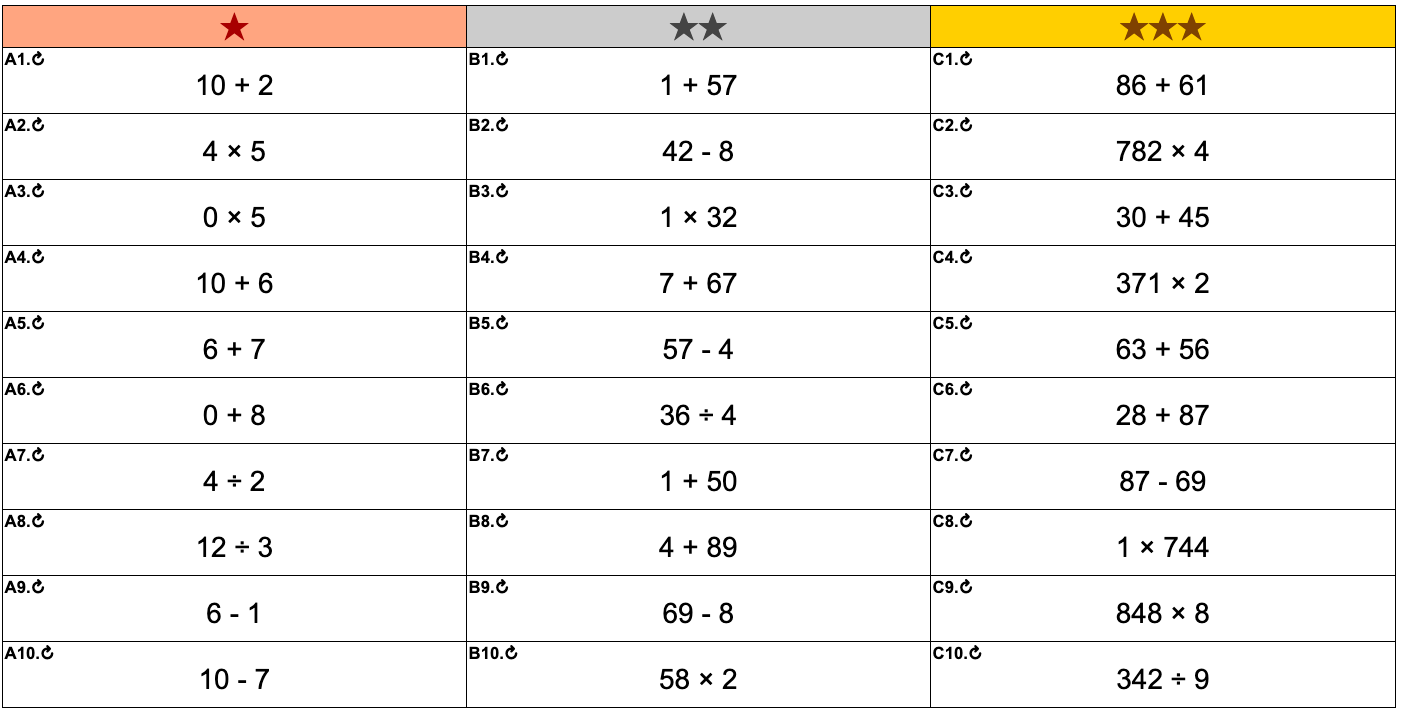
Answers will be posted with tomorrows blog!
- These are instructions for creating your own Mental Maths questions using the website we use in class.
- Go to the website – https://mathsbot.com/questionsIWB
- At the top, in the middle where it says ‘Topic‘ select option ‘3 (Arithmetic Four Operations)’
- Fiddle with the Difficulty on the right hand side – find a level which you think suits you! You have to ‘Create Questions‘ to see the new level
- Press New Questions to begin a 10 minute timer – 30 questions in 10 minutes – can you work out how long you have on average for each question?
- After the timer ends only press ‘Show Answers‘ – if you go to main menu you will lose the original questions.
Take care of yourselves
All the best everybody 🙂